Appearance
🔧 实现细节
自定义字体
字体下载
项目使用思源宋体和方正楷体。>>思源宋体下载地址<< || [>>方正楷体下载地址<<] || >>霞鹜文楷下载地址<<
项目使用霞鹜文楷
在实现方案章节中,我谈到了关于字体体积优化的原因,这里使用 ecomfe / fontmin 配合DavidSheh / CommonChineseCharacter,提取常用字,优化字体文件大小,可极大改善加载速度和浏览体验。
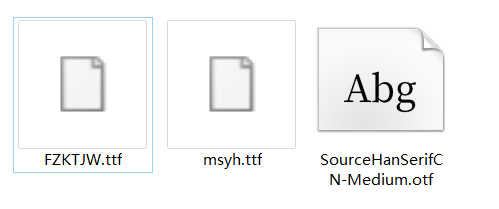
在 CSS 样式中定义 'SourceHanSerifCN-Medium' 作为自定义字体名称:
css
html {
    font-family: SourceHanSerifCN-Medium, "Source Sans Pro", -apple-system, BlinkMacSystemFont, "Segoe UI", Roboto, "Helvetica Neue", Arial, serif;
}

@font-face {
    font-family: STKaiti;
    src: url('nfzmscheme://FZKTJW.ttf') format('truetype')
}

@font-face {
    font-family: SourceHanSerifCN-Medium;
    src: url('nfzmscheme://SourceHanSerifCN-Medium.otf') format('opentype')
}

@font-face {
    font-family: PingFang-SC;
    src: url('nfzmscheme://PingFang-SC.ttf') format('truetype')
}

@font-face {
    font-family: PingFang-SC;
    src: url('nfzmscheme://LXGWWenKai-Medium.ttf') format('truetype')
}
字体加载的跨域限制
字体文件也会存在跨域限制,若 JS CSS 等文件部署在与入口文件不一致的域名上(测试环境与部署环境),必须将 @font-face 的源设置成 JS 文件相同的域名。
在构建时做路径转换处理:
javascript
//postcss.config.js
const fontsHost = process.env.NODE_ENV != 'production' ? '' : 'http://pub.tpl.infzm.com'
module.exports  = {
    plugins: {
        'postcss-url':
        [
            {
                url: (asset) => {
                    return ['/FZKTJW.ttf', '/SourceHanSerifCN-Medium.otf', '/LXGWWenKai-Medium.ttf'].indexOf(asset.url) > -1 ?
                        `${fontsHost}${asset.url}` : asset.url
                }
            }
        ]
    }
}
字体加载的拦截请求
加载自定义私有协议 nfzmscheme://SourceHanSerifCN-Medium.otf,并配合 APP客户端拦截协议请求,将响应包装成 HTTP 响应。
nfzmscheme:// 作为约定好的私有协议关键字。
Android 使用 WebResourceResponse API 实现 WebView 内私有协议拦截,处理并返回。
为优化加载速度,字体文件设置缓存策略,加入 Cache-Control 相应头,使得文件缓存时间更长,避免频繁请求。
java
webView.setWebViewClient(new WebViewClient() {
    @Override
    public WebResourceResponse shouldInterceptRequest(WebView view, WebResourceRequest webResourceRequest) {
        String url = webResourceRequest.getUrl().toString();
        Map responseHeaders = new HashMap();
        responseHeaders.put("Cache-Control", "max-age=290304000, public");

        if (url.contains("SourceHanSerifCN-Medium.otf")) {
            WebResourceResponse resourceResponse = null;
            try {
                AssetManager assetManager = getAssets();
                InputStream inputStream = assetManager.open("fonts/SourceHanSerifCN-Medium.otf");
                resourceResponse = new WebResourceResponse("application/octet-stream", "UTF-8", inputStream);
                resourceResponse.setResponseHeaders(responseHeaders);
            } catch (IOException e) {
                e.printStackTrace();
            }

            if (resourceResponse != null)
                return resourceResponse;
        }
        return super.shouldInterceptRequest(webView, webResourceRequest);
    }
}
图片的离线加载
WARNING
图片的离线加载功能 仅在 **Newsstand App **上实现,原因见 🔧 实现方案-图片的离线加载。
技术方案设计
统一采用自定义 Scheme + 内部保留伪域名的混合结构:
text
nfzmscheme://offline-resource.app.internal/images/2e38985f58.jpg?id=394570
\________/   \__________________________/ \____/ \____________/ \_______/
    │                      │                │          │            │
 自定义协议              保留Host         业务模块     文件名      关联业务ID
示例
在实际的前端落地中,会对 H5 页面中的图片标签进行重写转换。
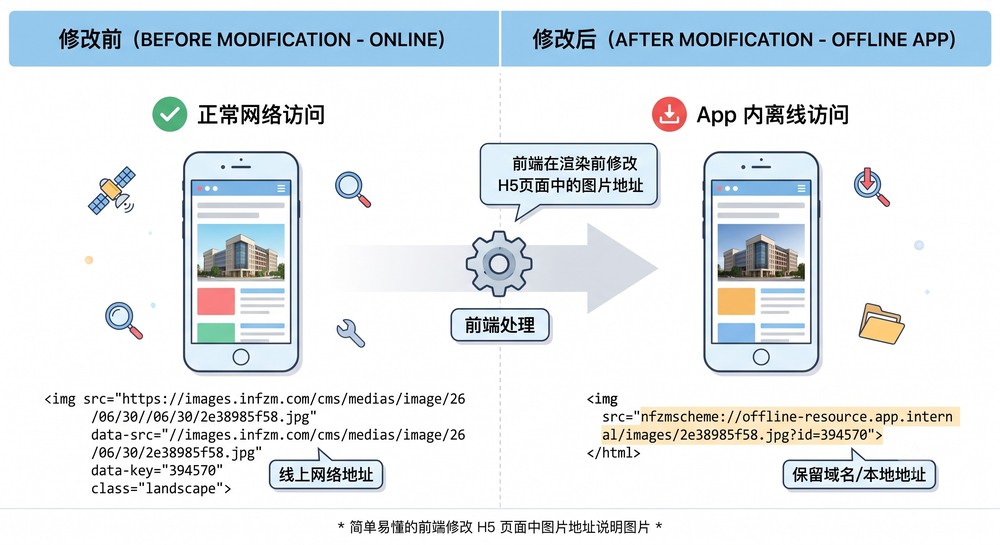
重写转换前:线上真实网络地址(用于正常 Web 端或外链分享兜底)
html
<img src="https://images.infzm.com/cms/medias/image/26/06/30/2e38985f58.jpg"
    data-src="//images.infzm.com/cms/medias/image/26/06/30/2e38985f58.jpg"
    data-key="394570"
    class="landscape">
重写转换后:离线拦截目标地址(用于 App 内部 WebView 容器解析)
html
<img src="nfzmscheme://offline-resource.app.internal/images/2e38985f58.jpg?id=394570" alt="">浏览器 UA
为了快速获取客户端平台和版本号,客户端已修改内置浏览器的 User Agent
类似的字符串 ${平台}_${应用名称}_${版本号} 会附在在原有 User Agent 的末尾,例如:
7.0.0 版本 iOS 客户端带有标识 iOS_iread_7.0.0:
cmd
Mozilla/5.0 (iPhone; CPU iPhone OS 13_3 like Mac OS X) AppleWebKit/605.1.15 (KHTML, like Gecko) iOS_iread_7.07.0.0 版本 Android 客户端带有标识 Android_iread_7.0.0:
cmd
Mozilla/5.0 (Linux; Android 8.0.0; SO-04H Build/41.3.B.1.82; wv) AppleWebKit/537.36 (KHTML, like Gecko) Version/4.0 Chrome/66.0.3359.126 MQQBrowser/6.2 TBS/045132 Mobile Safari/537.36 Android_iread_7.0.0User Agent 中表示的含义:
| 平台 | 应用名称 | 版本号 |
|---|---|---|
| Android | iread | 7.0.0 |
| iOS | iread | 7.0.0 |
| iOS | iread | 7.1.0 |
浏览器包含平台(iPhone/iPad/Android)标识,采用 iread/7.0.0 的命名方式能更好地融合到原有的 User Agent 中
文章页应用更新服务
运维通过 Nginx 脚本实现了对应APP版本的文章页应用更新服务,按照APP版本号和应用版本号,返回是否更新结果,如返回了更新包,
APP会判断提供版本是否大于本地版本,下载解压缩并应用到本地。
版本对应表
| 项目版本 | Android 版本 | iOS 版本 | 说明 |
|---|---|---|---|
| 1.22.1 | 9.0.5 | 9.0.5 | 修改周期课程显示效果和购买提示 |
| 1.21.0 | 9.0.4 | 9.0.4 | 评论显示用户勋章 |
| 1.20.1 | 9.0.1 | 9.0.1 | 调整音频课程中音频播放器占位大小 |
| 1.19.1 | 9.0.0 | 9.0.0 | 文章页关注栏目功能、增加b标签class标签白名单 |
更新服务
获取 iOS APP 9.0.5 版本更新包:
GET https://pub.tpl.infzm.com/mobile/get_app_temp
HTTP HEADER: User-Agent: iOS_iread_9.0.5
Response body:
json
{
    "code": 200,
    "data": {
        "tpl_version": "1.22.1",
        "path": "https://files.infzm.com/template/infzm-mobile-built-in-release-20250529_1.22.1.zip",
        "sign": "1b10bfb6ff2816a6ab80e9f3cbb860da",
        "use_online_page": 0
    },
    "msg": "iOS_iread_9.0.5"
}
将项目文件按照如下文件夹部署,并配合 Nginx 虚拟主机实现上述功能
conf
D:\WWW\TEST.MISAKA.IM    <----- root
├─1.1.x                <----- $path_dir
│      index.html       <----- project entry
│
├─1.2.x                <----- $path_dir
│      index.html
│
├─1.3.x                <----- $path_dir
│      index.html
│
├─default              <----- default version
│      index.html
│
└─default_ios_pre      <----- for ios release verison
        index.html
conf
map $http_user_agent $path_dir {
    ~*Android_iread_7.0.0  "1.1.x";
    ~*iOS_iread_7.0.0      "1.1.x";

    ~*Android_iread_7.1.0  "1.2.x";
    ~*iOS_iread_7.1.0      "1.3.x";

    default                "default";
}

server {
    listen 80;
    server_name test.misaka.im;
    root "D:/www/test.misaka.im/$path_dir/";

    location / {
        index index.html index.htm index.php;
    }
}
如果项目文件部署在 CDN ,那么重定向到 CDN 对应地址(点击展开)
conf
map $http_user_agent $redirect_host {
    ~*Android_iread_7.0.0  "http://www.baidu.com";
    ~*iOS_iread_7.0.0      "http://www.qq.com";

    ~*Android_iread_7.1.0  "http://www.baidu.com";
    ~*iOS_iread_7.1.0      "http://www.qq.com";

    default                "http://www.baidu.com";
}

server {
	listen 80;
	server_name test.misaka.im;
	if ($redirect_host) {
    return 302 $redirect_host$request_uri;
  }
}
客户端根据文档进行开发,前端将项目部署在 dev.tpl.infzm.com 和 pub.tpl.infzm.com 域名下,所有后端服务应切换至测试服,接口前缀为 http://dev.api.infzm.com/
- 文章页
{域名}/#/content/{id} - 电子报文章
{域名}/#/magazine/{id} - 课程详情页
{域名}/#/course_item/{id} - 打卡详情页
{域名}/#/challenge/{id} - 打卡详情页(简介)
{域名}/#/challenge_intro/{id} - 作业详情页
{域名}/#/task/{id}
摘测试服务器,调用这些 API 的页面分别有:
- 普通文章
http://dev.tpl.infzm.com/#/content/147022?debug=1 - 电子报文章
http://dev.tpl.infzm.com/#/magazine/147014?debug=1 - 课程详情页
http://dev.tpl.infzm.com/#/course_item/4?debug=1
流程可参考 页面生命周期
更新服务器
测试服: http://dev.tpl.infzm.com/mobile/get_app_temp
线上: https://pub.tpl.infzm.com/mobile/get_app_temp
参数 version=8.1.4 platform=[ireader|android]